
Start here
AI sounds sure even when it is wrong. Something should check.
DreamerOS is a second AI that checks the first one. It works inside the AI tools you already use, double-checks the answer before you act on it, and shows you what it checked.
853 confident wrong answers caught so far. 10,783 things remembered so you did not repeat yourself.
Try it free. No card, ever."Postgres is the better choice at 50k users."
Checked
A second AI checks the answer before you see it.
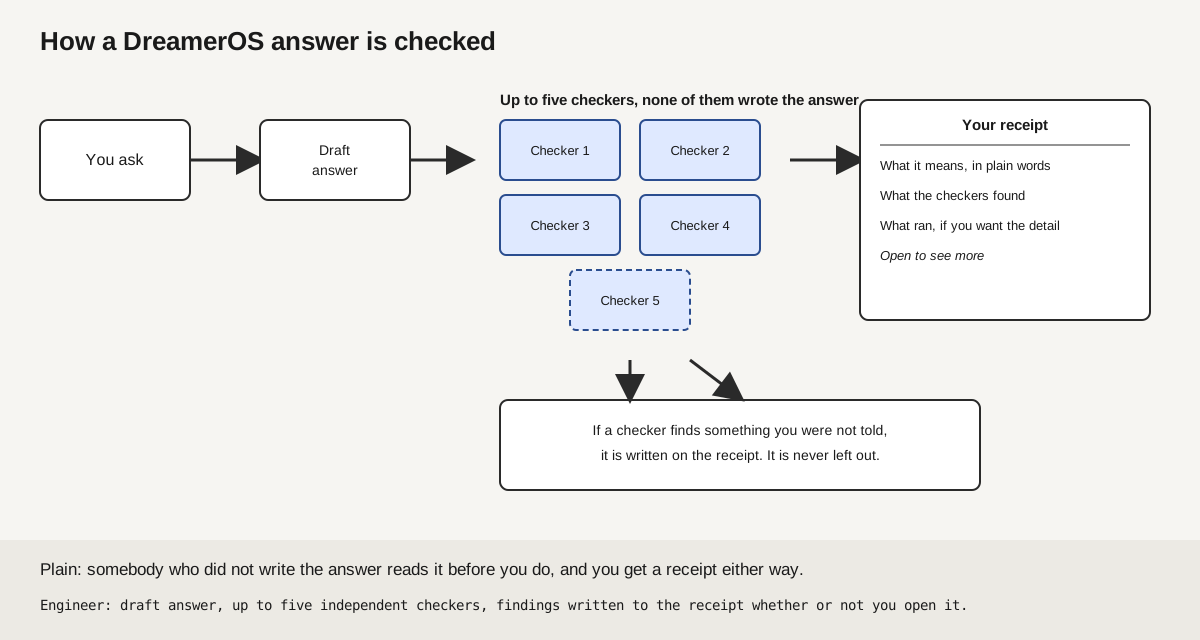
This is a checker reading the answer before it ever reaches you. Your question goes to the AI that handles it best. Before you see the answer, a different AI from a different company checks the claims in it. You get the answer plus a short list of what was checked, called the receipt. It will not spend, send, or delete anything on its own either; each plan has a daily spending limit it cannot pass.
See the working parts
Memory follows you
Tell it once. It remembers you in every tool.
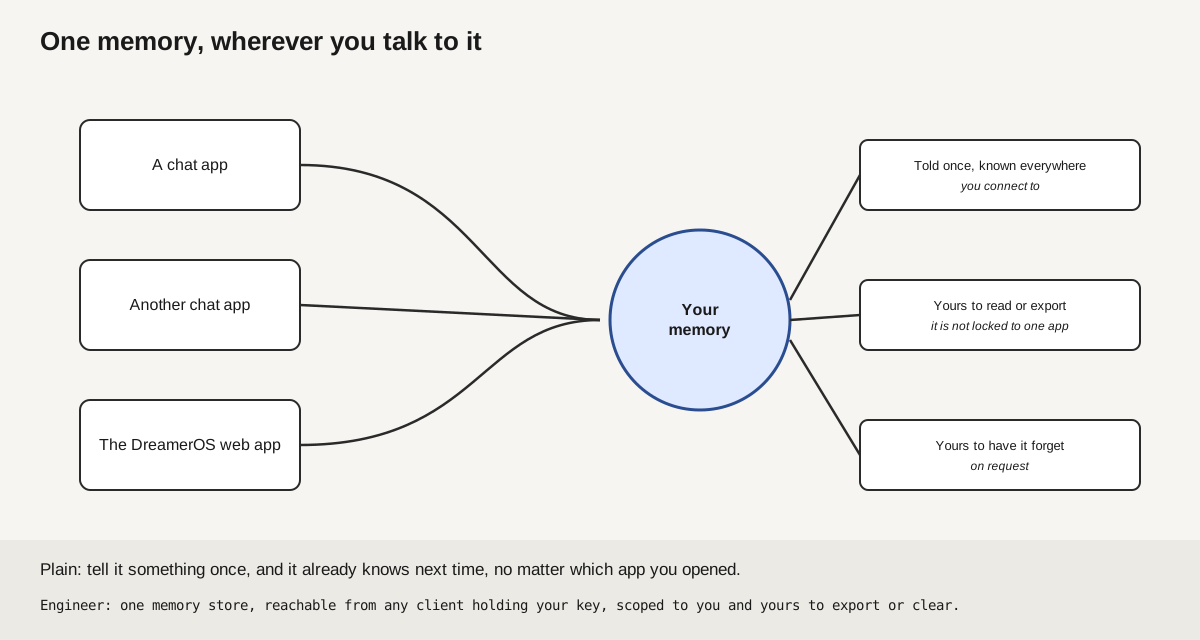
This is the one memory surface every connected tool reads from. Settle something in ChatGPT on Monday. Open Claude on Tuesday and it already knows. One memory, yours, shared by ChatGPT, Claude and the DreamerOS app, so you never paste the same thing between tabs again. Switch devices and it shows you where you left off.
See the working parts
Plans
Free to start. Pay only when you outgrow it.
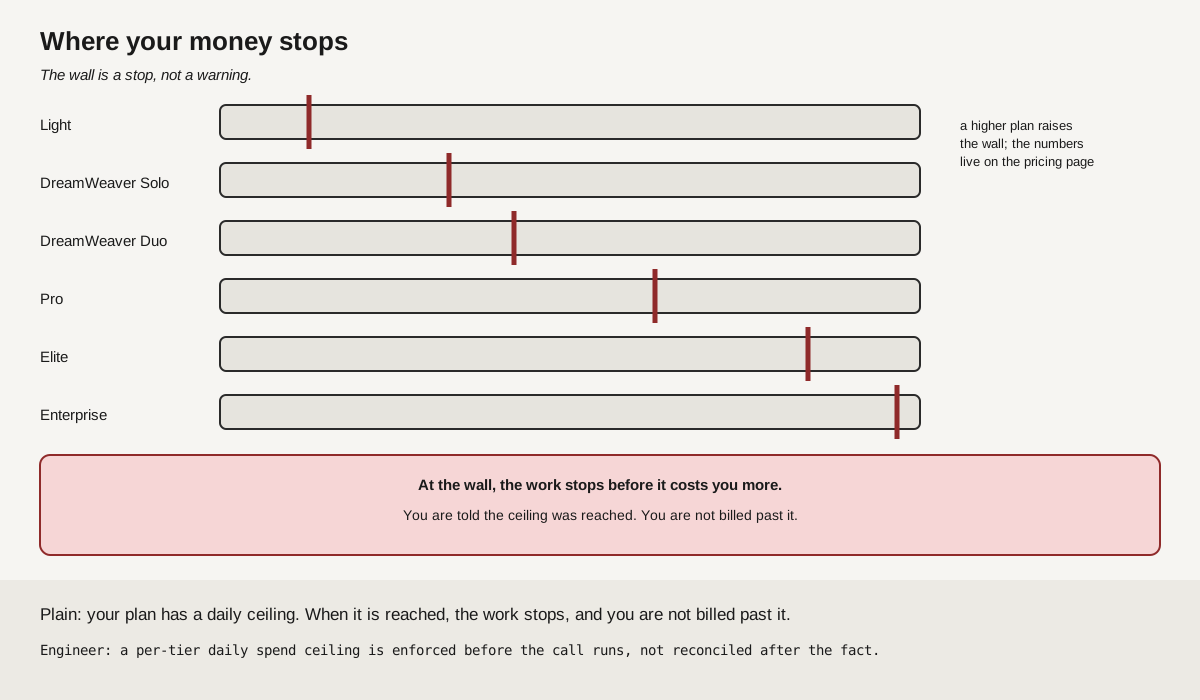
This is where each plan's daily ceiling sits, shown as a wall on each track. Start free, no card. The free plan stays free. When you want more memory, deeper checks, or all five AIs working on one question, move up a plan. Every plan has a daily spending limit, so the bill never surprises you.
See the working parts
New
Scanned PDFs are read without changing your file. Receipts name the engine that answered and the version of your standing instructions. A question that mentions an image gets an answer instead of a redirect. All of them, on the How it works page
The whole story
You are not bad at AI. The text box never checked what you meant. +
Scared of AI? Good instinct. Obsessed with AI? Even better.
Either way, you are in the right place. DreamerOS sits between you and the AI tools you already use - shapes the question, checks the answer, remembers what matters.
Free to start. No credit card required.
i feel like im undercharging but every time i try to raise prices i get scared and back out
A pricing confidence problem, not a market problem.
Three lowest-risk experiments to try first, in order.
You did not have to phrase that well. That is the point.
Where do I go from here? +
New AI, or a layer on the AI you already use? +
A layer. AI does not only have a quality problem. It has a structure problem around the model. DreamerOS supplies that missing structure without asking you to learn another chatbot. Keep typing the way you talk. DreamerOS shapes your question and selects an engine from your plan. It runs the available checks. It can carry the useful record into the next supported conversation.
You do not need to understand how any of that works. You just have to type.
What it will never do without you. +
Five things people worry about with any AI tool. Here is the current boundary for each one, including what runs first and what remains In Beta 2.0.
Five fears, five mechanisms +
- Delete your files. An advisory rule surfaces destructive commands to you before they run. It never asks the model nicely.
- Make something up and you never find out. DreamerOS shows which checks ran and what they found. Some checks run before delivery. Deeper checks can finish after the answer and never rewrite history to look like they ran first.
- Cost more than you expected. The Gateway checks a daily ceiling before new paid work. It covers spend routed through DreamerOS, not charges a provider can make outside DreamerOS.
- Forget what you told it five minutes ago. Account memory and handoffs carry useful context into supported clients. Full parity across every client remains In Beta 2.0.
- Leave you guessing who to trust. The signed-in record names the engine when the system records that field. The public receipt proves its own signature and time without exposing the private answer.
AI answered the words. It missed the meaning. +
Why AI keeps getting it wrong even when the model is good: every AI tool gives you a text box. The text box does not care if your question is precise. It does not ask follow-ups. It does not check its own work. It guesses at what you meant and delivers whatever that guess produced.
That is not only a model problem. It is a structural problem in the layer between you and the model. DreamerOS keeps the question, checks, and record together. You can see where an answer is thin before you rely on it.
Six different people, one messy sentence +
Pick the one that sounds most like you. These are worked examples, not claims that DreamerOS can see data you never connected. Each pull below requires the named source to be connected, permitted, and present. A missing source stays missing.
Founder. You type: "idk if i should hire a second engineer or just keep grinding solo for another quarter"
- Layer 1 - Restructure. Hiring decision under runway constraint. Pulls your stated burn rate, current shipping velocity, and the one bottleneck you mentioned last week into a structured trade-off frame.
- Layer 2 - Route + Verify. Sent to the strategy engine. Cross-checked against the unit economics you logged in March. Surfaces the question you actually need to answer first: which task is killing your velocity, not which seat is empty.
- Layer 3 - Remember + Forecast. "You did not ask about contractor versus full-time, but at your stage that decision saves three months and one bad hire."
Job seeker. You type: "i have a final round next thursday and they said it would be a case study but i have no idea what to expect"
- Layer 1 - Restructure. Interview prep request. Pulls company name from your resume context, role function from your application history, and the typical case format used by that company.
- Layer 2 - Route + Verify. Routed to research and reasoning engines in parallel. Surfaces three real case formats that company has used in past final rounds, with a worked example for each. Memory remembers your performance pattern from last week's mock.
- Layer 3 - Remember + Forecast. "You did not ask what to wear or how to handle salary if it comes up. Both will. Here is the answer for both."
Student. You type: "i kind of get the chain rule but every time the prof uses it on a real problem i lose the thread halfway"
- Layer 1 - Restructure. Conceptual gap, not a calculation gap. Pulls your last three problem sets to find the exact step where you stalled. The issue is not the rule. It is the substitution pattern that comes after it.
- Layer 2 - Route + Verify. Routed to the explainer engine. Builds three worked examples in increasing difficulty, each one showing the substitution step you keep skipping. Verified against your textbook's notation, not a generic notation.
- Layer 3 - Remember + Forecast. "Your next quiz will likely include implicit differentiation, which builds on this. You should preview that today, not the night before."
Manager. You type: "my best engineer is checked out and i need to have the conversation but i dont want to lose her"
- Layer 1 - Restructure. Retention conversation, not a performance conversation. Pulls your previous notes about her work, your last 1:1 themes, and the company patterns around senior IC disengagement.
- Layer 2 - Route + Verify. Sent to the people-strategy engine. Drafts three conversation openers, each tied to a different root cause hypothesis. Cross-references the management research that says checked-out usually means unmet growth, not unmet comp.
- Layer 3 - Remember + Forecast. "You did not ask whether to involve HR yet. You should not. Here is the version of this conversation that keeps it between the two of you."
Creator. You type: "my last 3 videos flopped and i feel like im losing the thread of what people actually want from me"
- Layer 1 - Restructure. Audience drift question, not a content quality question. Pulls your top 10 videos by engagement and your last 10 by date. The pattern is in the gap between the two lists, not in the videos themselves.
- Layer 2 - Route + Verify. Routed to the audience analysis engine. Identifies the specific topic shift in your last quarter and the audience segment you stopped speaking to. Voice profile preserved across the analysis so the recommendation sounds like you, not like a marketing report.
- Layer 3 - Remember + Forecast. "You did not ask whether to pivot or rebuild. The answer is rebuild, and here is the first video that does it without alienating the people who stayed."
Engineer. You type: "the auth service is the bottleneck and im not sure if i should rewrite it or just shard it"
- Layer 1 - Restructure. Architecture decision under load. Pulls your service's request pattern, current p99 latency, and the framework constraints you flagged in your last design doc. The right question is whether the bottleneck is CPU, lock contention, or token validation.
- Layer 2 - Route + Verify. Routed to the architecture engine. Compares the rewrite path against the shard path on three axes: time to ship, blast radius, and rollback cost. Verified against the patterns your stack actually supports, not the ones a generic answer would assume.
- Layer 3 - Remember + Forecast. "You did not ask whether to add a caching layer first. That is probably the answer for the next 90 days, and it buys you the time to do the rewrite right."
Try your own messy sentence Learn more about the structural problem
AI broke the lamp. Then argued about the definition of "broke." +
A wrong answer is one problem. A wrong answer that survives its own correction is another.

See the full story +
Type messy. Get expert output. +
You bring the messy question. DreamerOS does the shaping, the checking, and the memory, on top of the AI you already use.
Three invisible layers. One sentence from you.
What happens to one sentence +
You type: "help me with my landing page conversion"
- Layer 1 - Restructure. The vague question becomes a structured brief using the audience, funnel state, baseline, and friction point you provided or connected.
- Layer 2 - Route + Verify. An available engine handles the task. The receipt shows which checks ran, which evidence was missing, and whether an independent verifier joined.
- Layer 3 - Remember + Forecast. You can save the decision for supported clients and review the follow-up questions before acting.
What people type, what DreamerOS reads +
The same messiness that trips up every other AI tool. Reshaped into the question they were actually asking.
Pricing decision. What you typed: "i feel like im undercharging but every time i try to raise prices i get scared and back out"
What DreamerOS heard: A pricing confidence problem, not a market problem. The fear pattern indicates the issue is positioning, not the number itself. Surface the three pricing experiments lowest-risk to highest, with the script for each conversation.
Stuck on a hire. What you typed: "two finalists, one is technically stronger but the other one i actually want to work with, and i cant figure out which signal to trust"
What DreamerOS heard: A hiring decision where instinct and resume disagree. The right framing is not which is better. It is which mistake is harder to recover from at your stage. Walk through both failure modes before picking.
Health question you do not want to ask. What you typed: "my back has been off for like three weeks and i dont want to make a thing of it but its starting to mess with how i sleep"
What DreamerOS heard: Persistent musculoskeletal symptom, three-week duration, sleep disruption now present. That last detail changes the threshold. Surface the difference between "wait and see" and "see someone this week" with the criteria for each, no fearmongering.
Relationship friction. What you typed: "my partner and i keep having the same fight about money and i dont even know what its really about anymore"
What DreamerOS heard: Recurring conflict where the surface topic is not the actual disagreement. Money fights almost always proxy for one of three deeper concerns: control, fairness, or future safety. Help identify which one before suggesting any conversation script.
Your AI finally has a memory that follows you. +
Separate AI products do not automatically share the decision you made in another vendor. Without a shared layer, your context stays inside whichever tool you used last.
DreamerOS gives your account one memory and handoff layer that supported clients can read from and write to. Decide something in one connected tool, then carry the useful record into another. Full parity across every client remains In Beta 2.0.
ok we are going with the flat two tier price, kill the middle plan
Working from your two-tier decision. It does not ask you again.
The decision stays with you, not with the tool you used last.
You did not paste anything between tabs.
The moment it clicks +
"The moment it clicks: when you ask Claude something on Tuesday and Claude already knows what you decided in ChatGPT on Monday."
The DreamerOS difference, in one sentence.
One platform. It works where you work. +
Three current doors lead into the same DreamerOS account: the free browser start, the ChatGPT Store, and supported DreamWeaver connections. Full parity across every AI client remains In Beta 2.0.
Three doors in +
- GPT Store - DreamerOS GPT. Free in the ChatGPT Store. Zero install. Type normally and see the structure it can add.
- Web App - DreamerOS Web. Question shaping, visible check status, account memory, and receipts in the browser. Free to start; deeper checks and cross-session memory begin with DreamWeaver.
- MCP Connector - DreamWeaver. Add DreamerOS memory and checks to supported AI tools. Cross-client parity remains In Beta 2.0.
Works for how you actually work +
Not a chatbot. A working layer whose available modules depend on the plan, connection, and evidence in the request.
- Business strategy. A vague market question can become structured analysis, and a saved decision can return in a supported session.
- Software development. An architecture question can be routed to an available model while trade-offs stay visible.
- Content + writing. A direction set can carry voice rules, and claim checks can show what they did or did not verify.
- Research + learning. Grounded routes can compare sources. The record says when no source check ran.
- Career + decisions. A deeper verification path can surface assumptions and risks without pretending to make the final decision.
- Creative work. Saved style rules and memory can travel through supported routes when the client loads them.
Things you did not know AI could do for you +
These are not a pile of features firing blindly on every message. They are capabilities the integrity layer can apply when the request, tier, and evidence call for them. The checks that do run stay visible in the result.
- Honest Mirror. When the checks find a weak premise, DreamerOS can put that problem beside the answer instead of hiding it.
- Drift Protection. Cross-turn checks can compare a new answer with the context and facts already attached to the thread. Results finish in the audit record; full correction before delivery remains In Beta 2.0.
- Silent Second Opinion. A separate engine can review an answer after it is generated. Its result joins the record when it finishes; it never rewrites history to look like it blocked delivery.
- Argument Sharpening. An adversarial review can surface weak claims and counterpoints before you choose to send a draft.
- The Follow-Up You Did Not Ask. When the follow-up tool runs, it can surface the next useful question. It is assistance, not a promise that every response predicts you.
- Knowledge Decay Detection. Freshness checks can flag context that needs another source or a newer reading. The record says whether that check ran.
- Style That Travels. Direction sets carry your chosen voice and working rules into supported DreamerOS routes. Full parity across every client remains In Beta 2.0.
- Memory That Travels. A fact saved to your account can appear in another supported client after that client loads the same memory. Missing or disconnected memory stays missing.
- Meeting Prep From Memory. DreamerOS can assemble a brief from account memory it can actually reach. It does not claim access to every conversation, and the time depends on the work and sources.
More of DreamerOS. Now explained on this page. +
Eight capabilities the earlier page did not explain. Each one names the current path and the Beta 2.0 boundary that still applies.
Eight capabilities and their current limits +
- Scanned PDFs can be read. The upload path can run OCR on image-only pages without changing the original file. The paid-tier customer walk remains In Beta 2.0. Wire: app -> gateway absorb and upload | HTTPS multipart | OCR result or a visible failure
- Up to five named checks, plus an independent verifier. The system can choose up to five check types for a turn. It can select an independent verifier from a multi-vendor pool. That verifier did not write the answer. Wire: gateway -> check picker and verifier pool | selected checks plus one verifier from a different model family | result recorded when available
- Receipts stay honest about whether they exist. DreamerOS tries to attach a receipt to each completed answer. Light includes receipts up to 25 a day; paid plans have no daily receipt cap. If the meter is reached or minting fails, the answer continues and the missing receipt stays missing. Wire: gateway -> receipt meter and signer | signed CTCI receipt when minted
- Questions that mention images can stay in chat. The image-question route can answer a mixed strategy and image request instead of always redirecting to the media page. Coverage across every chat remains In Beta 2.0. Wire: app -> gateway route | session auth | answer or visible refusal
- Session handoff card. A supported client can read the latest account handoff and show where the work stopped. Automatic pickup in every client and device remains In Beta 2.0. Wire: gateway -> client | HTTPS and MCP | session auth
- Continuity across engines. Connected clients can carry a saved decision and current handoff into the next engine. Automatic continuity on every switch remains In Beta 2.0.
- Direction Set Workshop. Write your standing instructions once, apply them on supported DreamerOS routes, and export them in 21 registered vendor formats. Wire: app -> gateway workshop | one direction set | session auth | Pro and DreamWeaver
- Receipt archive. Open a receipt that was successfully minted and see the fields that were actually recorded. Wire: app -> gateway receipts | your signed-in archive plus the narrow public verification view
Three reasons this is harder to copy than a page design. +
A competitor can copy colors and components. The harder part is joining provider-independent memory, cross-provider checking, and an inspectable record without turning one model vendor into the judge of its own work.
The three structural reasons, in full +
Cognitive Fingerprint. When connected traffic passes through your DreamerOS account, memory and working preferences can accumulate outside any single model vendor. Five customer engine families can use the gateway today; using the same fingerprint in every client remains In Beta 2.0. Read the principle
Vendor Incentive Asymmetry. A model vendor naturally optimizes its own product. DreamerOS can compare and record work across providers because it sits above the provider choice. That position is the Stiletto Principle. Read the principle
Append-Only Decision Log. Recorded events use an append-only audit path that can support traceability and record-keeping work. That evidence can help an organization assess Article 12 obligations for a high-risk AI system. It does not by itself certify compliance, classify the system, or satisfy the rest of the law. See the pipeline
Not a wrapper, an integrity layer +
For developers: when a receipt is minted, DreamerOS keeps the record separate from the model that generated the answer. The signed-in archive can carry private execution details. The public receipt stays intentionally narrow.
The public sample proves its signature and time without exposing the private question or answer. Open your signed-in record for the work details that were actually captured.
| The record can answer | What you can inspect |
|---|---|
| Did the answer hear the question? | Your signed-in record keeps the request beside the answer when that field was captured. |
| Did somebody else check it? | The record says whether an independent check ran and names its result when available. |
| Did it open real sources? | Grounded results can carry cited evidence; an ungrounded result does not borrow that proof. |
| Who actually answered? | The signed-in archive can show the served model, provider, fallback, token use, cache result, and cost when those fields exist. |
| Can I verify the public record? | The public receipt carries its ID, time, signing key, input hash, and verification state. |
The pitfalls you already hit. Named, not hand-waved. +
The engineering example follows a "rewrite or shard the auth service" decision through routing, available checks, and a receipt. Five familiar pitfalls, with the mechanism and its limits named.
Five mechanisms, not five features +
- Wrong model for the task. A routing registry names the task and the engine. Not a vibe. Every dispatch names its model.
- Silent hallucination with no flag. Up to five named check types can apply to a turn. When the independent verifier runs, a checker from a different model family reviews the answer. The system records the result.
- No audit trail when something goes wrong. When a receipt is minted, DreamerOS writes the event to the append-only record. Public receipts prove signature and time; signed-in records can carry more detail.
- Cost surprises with no cap. The Gateway checks its daily dollar ceiling and token budget before routed spend. Provider-side work outside DreamerOS is outside that wall.
- Context loss between engines. A supported client can read the current session handoff. Automatic pickup in every client and device remains In Beta 2.0.
Not a wrapper, verifiable +
The receipt ledger below is public. Open it right now. It is not a badge, and it is not a claim you have to trust.
Start free. Upgrade when the ceiling hits. +
No credit card to begin. No surprise limits. Move up only when you actually need more.
The plan families, with Solo and Duo shown separately +
| Plan | Price | What you get |
|---|---|---|
| DreamerOS Light | Free | The free starting layer. No credit card.
|
| DreamWeaver | $14.00 Solo / $24.99 Duo each month | Keep the AI tools you use and add DreamerOS around them.
|
| DreamerOS Pro | $39.99 / month | All five customer engine families and the deepest individual verification tier.
|
| DreamerOS Elite | $149.00 / month | Team-grade verification for organizations. By invitation only.
|
The questions people ask first. +
Depth on demand. The short answer is here on the surface. Open a question when you want the full one.
How is this different from just using ChatGPT? +
DreamerOS is not a replacement for ChatGPT. It is a layer around the model you already use. It can reshape the input, run the checks available to your plan and turn, and save decisions for supported clients. The record says what actually ran. DreamerOS Light is free inside ChatGPT.
Do I need to learn prompt engineering? +
No. Type the way you would talk to a smart colleague. DreamerOS handles the translation between your intent and the structured input the model needs. That is what the question-shaping layer does on every message.
Is my data private? +
Your account memory and conversations are stored in DreamerOS infrastructure so the service can return them to you. You can inspect, export, and remove saved memory. AI providers process the prompts sent to them under the terms of that provider or your own connected account; the current DreamerOS receipt does not prove a provider's training or retention status. DreamerOS does not sell or use your data for advertising.
Why does DreamerOS answer the question you meant, not just the question you typed? +
Most AI tools can follow the words and still miss the point. DreamerOS uses three intent checks: did the answer follow what you said, did its consequences match what you wanted, and did it stay aimed at your actual goal? The record shows what ran instead of asking you to trust a perfect score. Read the full spec
What happens in your first 60 seconds +
The first-minute path is a guided example, not a speed guarantee. There is no prompt format to memorize.
- Start with one messy question. Use the version you would say out loud. Half-formed is fine.
- See what structure and checks were available. The question can become a clearer brief, an available engine can answer it, and the record shows which checks actually ran.
- Ask the next question. When memory is enabled and the next client loads the same account record, the useful decision can follow. Full parity across every client remains In Beta 2.0.
More questions +
Stop fighting with AI. Start using it. +
You do not trust the text box. Good. DreamerOS does not replace your AI - it checks its work before you act on it.
Free to start. No credit card required.
Another door in +
Prefer to stay inside ChatGPT? DreamerOS GPT is free in the ChatGPT Store.
The longer version of the pitch +
AI sounds sure. That does not mean it understood you.
Say what worries you. See an example of the first question DreamerOS would ask.
direction inbound | protocol HTTPS to /reflect.php | auth none for the demo | scope illustration only, no network call
No card. No signup wall. Just ask.
Move across the print
What brought you here?
Say what worries you. Type the rough version....
Show an example check. Example check. What did you mean?
DreamerOS would show what it thinks you mean before you decide if the answer helps.
Illustration only. Nothing is sent. This does not check or answer your question.
- Is the AI making this up? Open the evidence. See what DreamerOS checked and what it could not support. See the evidence
- I don't know what to ask. Start with your rough words. DreamerOS turns them into a clear question. See what changes
- Why did it forget what I said? See how shared memory can carry decisions between supported tools. See how memory works
- What can it do without me? See the limits, how you connect tools, and what to ask before you give AI more access. See the boundaries
- Show me what actually happened. Open the public record. Inspect what happened instead of trusting a summary. Open the public record